Posts

Activate Python Virtual Environment to keep each project using separate Packages
Image
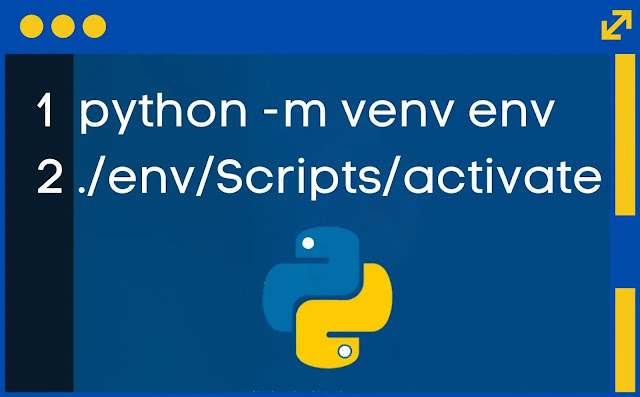
Activate python terminal virtual environment When you're working on multiple Python projects, it's really important to keep the different packages (or dependencies) for each project separate. This is because sometimes, one project might need a different version of a package than another project. If you don't separate them, things can get mixed up and cause problems. In other programming languages like Java with Maven or JavaScript with Node.js, you don't really have to worry about this because they handle it automatically. But in Python, you need to use something called a virtual environment for each project. Here’s how you can do it: 1. Create a virtual environment for your project by opening your terminal (or command prompt) and typing: python -m venv myenv Replace "myenv" with whatever name you want to give your virtual environment. 2. Activate the virtual environment: - On Windows, type: myenv\Scripts\activate - On macOS and Linux, type: so...

Allow PS1 Scripts Execution on Windows Terminal PowerShell

Image
Windows Terminal PowerShell To allow the execution of scripts ( .ps1 files) on your system, you'll need to change the execution policy. You can do this by running as an Administrator and using the following command: 1. Open as Administrator: - Press Win + X and select Windows (Admin) or Windows Terminal (Admin) if you're on a newer version of Windows. 2. Change Execution Policy: - To allow the execution of scripts, run: Set-ExecutionPolicy RemoteSigned - This policy allows scripts created on your local computer to run, but scripts downloaded from the internet must be signed by a trusted publisher. 3. Confirm the Change: - will prompt you to confirm the change. Type Y and press Enter to proceed. I think Windows is the best operating system because it's super easy to use, and most people are already familiar with it. Plus, it runs all kinds of programs, from games to school stuff. Now, they've got this new thing called Microsoft Windows Terminal. It...

Introducing Kafka Web Client: A User-Friendly Interface for Kafka Clusters

Image
Kafka explorer web client Hey everyone! I’m super excited to share with you a project I’ve been working on – the Kafka Web Client ! It’s a web-based tool that makes it easier to connect with Kafka clusters, send messages, and listen to topics. If you’ve ever worked with Kafka, you know it can be a bit tricky, but this client aims to make everything a whole lot simpler with a clean and responsive UI. What is Kafka Web Client? The Kafka Web Client is like a bridge between you and your Kafka brokers. It gives you a neat, user-friendly interface where you can easily connect to Kafka brokers, send messages to topics, and even listen to real-time messages as they come in. It’s built using some awesome technologies like Express , Kafka-Node , Socket.io , and SQLite on the backend, and Tailwind CSS and jQuery on the frontend. Cool Features You’ll Love Here’s a quick look at some of the neat features: - Connect to Kafka Brokers : You can manage connections to different Kafka broker...

JavaScript Code to Migrate Your Blogger Content to SQL

Image
Export blogger post to MySQL Are you thinking about moving your blog from Blogger to something more powerful? We’ve got something new called Blogger to SQL Dump that can help make this change super easy! What is Blogger to SQL Dump? Blogger to SQL Dump is a handy tool made with Node.js. It lets you log in with your Google account, pick any of your Blogger blogs, and turn all your blog posts into an SQL file. This is really useful if you want to move your blog to platforms like WordPress, Drupal, or even your own website with a database. Cool Features - Safe Google Log-in : You can log in securely with your Google account to see your blogs. - All Your Blogs in One Place : You can see all your Blogger blogs and pick which one you want to export. - Easy Export : With just one click, you can download all your blog posts as an SQL file, ready to go into your new website. - Simple to Use : The tool has a clear and easy-to-use interface, so you won’t get lost! Why Use Blogger to SQL Dump? M...

How to make shortcut key Ctrl + Alt + T to open Windows terminal

Image
Windows Desktop Shortcut Today, I'm going to share a cool trick on how to open the Windows Terminal using only shortcut keys! We’re going to set the shortcut as Ctrl + Alt + T so you can do it super fast without touching the mouse. Here's how you can do it: 1. Create a Shortcut for Windows Terminal ( wt.exe ): - Right-click on your desktop or in a folder where you want the shortcut. - Select New > Shortcut. In the location field, enter the path to wt.exe: Copy file path: C:\Users\YOUR_USER_NAME\AppData\Local\Microsoft\WindowsApps\wt.exe OR C:\Windows\System32\wt.exe - Click Next, then name the shortcut (e.g., "Windows Terminal"). - Click Finish to create the shortcut. 2. Assign Ctrl + Alt + T to the Shortcut: - Right-click the shortcut you just created and select Properties. - In the Shortcut tab, find the Shortcut key field. - Click inside the field and press Ctrl + Alt + T on your keyboard. This will automatically set the shortcut key to Ctrl ...

How to Switch Between Account in Google Platform: Drive, Docs, YouTube, Gmail

Image
Google Products We use Google a lot, becoming increasingly dependent on their services. Google offers many web-based platforms, such as Google Docs, which can replace Microsoft Office. Often, we have more than one Google account – one for work and another for personal use. It's not convenient to have them running on the same browser, but there's a trick to switch between those accounts. The trick lies in the URL. When you open Google Docs, you'll notice the URL https://docs.google.com/u/0 . By changing the 0 to 1, the URL becomes https://docs.google.com/u/1 , and it will switch to your second account. If you have a third account, change the 1 to 2, and continue increasing the number for additional accounts. The number in the URL ( u/0/ or u/1/ ) represents the user account context within the Google Docs environment. Google allows users to be signed in to multiple Google accounts simultaneously in a single browser session. The number indicates which user account is ...

The World is Destroyed by The Apps and The Internet

Image
Dystopian future on earth and the doom of humanity As a developer, I've been reflecting on the impact of apps, social media, and the internet in general, and sometimes it feels like the negative aspects outweigh the positives. While software can indeed help people, it often seems like its benefits primarily serve those who are already well-off, making the rich richer and widening the gap between the wealthy and the poor. Software doesn't alleviate poverty or end world hunger. Its impact is more about providing conveniences to those who can afford them, rather than creating substantial change for those in need.  Moreover, software can sometimes divide us as social creatures. People might become more selfish, spending time on distracting entertainment apps instead of engaging in real communication. It also provides a platform for bad actors to spread propaganda and misinformation. Social media Influencers Recently, I've come across some revelations about Mr. Beast, one of the...

Change GitLab Account on your local Git configuration on Windows

Image
The amazing Gitlab Recently, I created a new GitLab account and wanted to switch to it on my local machine. When pushing to a remote repository, the credentials from the first account are still being used. Typically, you need to remove the old user credentials and then authorize the new account. Here's how to do that on Windows. 1. Remove Stored Credentials If you've been using HTTPS for authentication, your credentials might be stored in the Windows Credential Manager. Removing these old credentials is the first step to ensure that your local machine asks for the new ones. Using Windows Credential Manager Open Credential Manager: Press Win + S , type "Credential Manager" and open it. Find GitLab Credentials: Navigate to the "Windows Credentials" tab and look for entries related to GitLab, which are likely named something like git:https://gitlab.com . Remove these entries to delete the stored credentials. Remove these credentials 2. Update Git Use...

Create a Live Chat Web Widget Tutorial using Javascript

Image
Simple live chat javascript demo There's been so many chat widgets out there you can just use. But what if you want to create and manage the entirety of your system by yourself? It's very easy to create another live chat widget on your own. In today's tutorial, I'm going to show you how to create a live chat using JavaScript and Node.js. The chat will be very simple, allowing you to modify it according to your needs and styles. The main features of our chat will include: - A page for clients - A page for the admin that can simultaneously reply to all incoming client chats We'll begin by setting up the client-side of our chat application. This will be the interface that your users interact with when they visit your site. The HTML file, which we'll call user.html , will contain the basic structure for the chat interface. You can style it to fit the look and feel of your website, adding CSS for visual appeal and JavaScript to handle the interactions. Ne...

Unix Tail Command on Windows to Print Live Logging

Image
Show live logs in windows Windows is a great operating system for day-to-day use, but there are some things in Linux and Unix that Windows doesn't have out of the box. For example, when I need to SSH into a Linux server, I often want to view log files using the tail command. Unfortunately, Windows doesn't have a native tail command. However, we can create our own function to mimic this simple tail operation using PowerShell. Using Get-Content Get-Content -Path logfile.txt -Wait To mimic the Unix-like tail -f command in PowerShell permanently, you can create a custom function in your PowerShell profile. 1. Open PowerShell or Windows Terminal : First, open Windows PowerShell or Windows Terminal and ensure you're using PowerShell. 2. Modify Your PowerShell Profile : Your PowerShell profile is a script that runs every time you start a new PowerShell session. To edit this profile, open it with any text editor. The profile is typically located at Documents\WindowsPowerShe...

When a Developer Starts to Hats the Computer

Image
Developer hustling As a developer working a 9 to 5 and then continuing to grind on a side hustle afterwards, I often feel incredibly stressed. I can't quite pinpoint if it's the lack of sleep and exercise or the unhealthy food I consume, but I'm starting to despise working with the computer. Even just touching the mouse and navigating to the app I need feels overwhelming. Sometimes, I wonder if I should take a break from chasing that dream startup I've been envisioning and just focus on achieving a healthier work-life balance with my day job. The constant hustle can be exhausting, and I'm beginning to question whether pushing through is the best path or if stepping back might help me recharge and ultimately bring my startup vision to life with renewed energy and clarity. Balancing the demands of a full-time job, a side hustle, and family responsibilities can be overwhelming. I have family that I don't want to miss the time we together, adding another layer of pr...

Am I Going to Hell for Working as a Game Developer?

Image
Sunset at the beach I’ve been spending a lot of time binge-watching "The Good Place" lately, a show where people are sent to a good or bad place based on their actions while they are alive. It’s essentially a modern take on the concepts of heaven and hell. Personally, I think it’s one of the best TV shows ever made because I enjoy philosophy. Lately, though, it’s made me think about my own ethical dilemmas. I work as a developer in the entertainment game industry, and sometimes I wonder if my job is actually benefiting society. Are we just encouraging people to spend their time and money on something that might not be good for them? Are we fostering selfish behaviors and contributing to negative consequences? But then, I remind myself that my goal is to create engaging and enjoyable software. I want people to love what I create and find happiness in it. It’s not my intention to make them waste their time and money. In my defense, creating something that brings joy is already ...

Ffmpeg tutorial video to photos

Image
Ffmpeg video to photos I’ve found that FFmpeg is incredibly useful for handling various video operations. For instance, when I need to extract images from a video I’ve recorded, FFmpeg comes in handy. Sometimes, capturing the perfect photo can be tricky. It’s much easier for me to record a scene and then extract each frame from the video. This way, I can pick the best shots for social media or any other purpose. Here’s how you can do it: 1. Install FFmpeg (if you haven’t already): - On Windows, you can use Chocolatey, a package manager for Windows. - Simply open a command prompt and run choco install ffmpeg 2. Open a terminal or command prompt on your computer. Run the following command to take a PNG screenshot every second from a WEBM file: ffmpeg -i input.webm -vf "fps=1" screenshot_%04d.png Explanation of the command: -i input.webm: This specifies the input WEBM file. You can replace input.webm with your own video file, whether it's in MP4, MKV, or ano...

HTML CSS Ripple Effect When User Click Any Button

Image
Button click ripple effect As a UI/UX developer, I sometimes need to implement cool effects from other platforms that aren't natively supported in my environment. One example is the material design Ripple effect. Below, I've included some CSS and JS code to override the button click effect to use the material ripple effect. The ripple effect is like a droplet of water. When you click or touch the button, it shows ripple effects, adding more interaction and feedback for the user. This helps users know exactly that their action has been registered. As UI/UX developers, it's crucial to provide feedback to users to indicate that their actions have been registered, preventing them from clicking the button multiple times out of uncertainty. This ripple effect accomplishes that. When working on Android mobile devices, native UI components often include material design elements by default, such as the ripple effect when using material design. However, web interfaces can be a bit ...

Search all files in Linux and open it in Vim directly

Image
FZF combine with VIM I've recently discovered a neat trick that combines FZF and Silver Searcher (ag) to make my development workflow smoother. If you're like me and you want to respect your .gitignore while using FZF, and you also want to open files in Vim straight from FZF, here's a simple guide: First things first, you'll need to install FZF and Silver Searcher. You can do this easily with the following command: sudo apt- get install fzf silversearcher-ag Once you have these tools installed, the next step is to tweak your .bashrc file to set up the right environment variables. This ensures that FZF respects your .gitignore file by default. Open your .bashrc file with your favorite text editor: nano ~/.bashrc Add the following line to the file: # For respecting gitignore export FZF_DEFAULT_COMMAND= 'ag -g "" ' This command tells FZF to use Silver Searcher (ag) to list files, respecting the .gitignore . Next, let's set up a function i...

Dark Mode Toggle Javascript Tutorial For Website or Blog

Image
In today's post, I'm excited to share a simple yet powerful way to add dark mode functionality to your website or blog. This is especially useful because many web technologies still struggle to follow system themes automatically. Even though users can find dark mode plugins for browsers, not everyone has them installed. This tutorial is part of a series where I share various widgets that I have created for blogs and websites. Today, we’ll look at how to implement a ‘Dark Mode Toggle’. This button will allow your visitors to switch your site’s theme between dark and light modes effortlessly. The beauty of this dark mode toggle is that it is created purely using vanilla JavaScript, meaning it doesn’t require any additional libraries. This makes it incredibly easy to integrate into any website, whether you’re using Blogger, WordPress, or any other platform. To get started, simply copy and paste the following code snippet before the closing `</body>` tag in your HTML file,  (...

Add Floating Go to Top Button Into Your Website or Blog

Image
Embeddable script 'go to top' button Today, I'm going to explain how to place a floating "Go to Top" button on your Blogger site. This can also be applied to any website, not just Blogger. The process is straightforward and only requires adding a script before the closing </body> tag of your HTML. Here's how to do it: 1. Log in to Blogger - Navigate to the Theme menu. - On your active theme, instead of pressing Customize , click the triangle icon to reveal additional links. - Select Edit HTML . - Scroll to the end of the HTML or search for the </body>  tag. - Insert the following script right before the </body> tag: Here's the script to Add Floating Go to Top Button in your website (any website). The only magical part of the entire script is this snippet: button.addEventListener('click', function() { window.scrollTo({ top: 0, behavior: 'smooth' }); }); Everything else is j...

STOP following those self-help content, START doing your immediate tasks and responsibilities

Image
The fastest way to reach any point is Start to walk immediately I feel like I'm almost halfway to achieving my dreams, thanks to the mindset I've developed from all the self-help books and content I've consumed over the years. It's been quite a journey, and I've learned a lot. However, this relentless drive towards a big dream has made me somewhat of a workaholic. I've become so focused on achieving something monumental that I've started to forget about my surroundings and the simple pleasures in life. The Cost of Chasing Big Dreams This idea of achieving something grand has made me lose touch with everyday joys. I can't remember the last time I truly savored the taste of my food or enjoyed a small moment without thinking about the next big milestone. The constant chase for something bigger has overshadowed my ability to appreciate the here and now. Taking a Break from Self-Help Content So, I've decided to take a break from all the self-help content ...

If money is your main motivation reconsider being a developer

Image
The contrast money situation between developer and Influencers If money is your main motivation, you might want to reconsider becoming a web developer or any other kind of developer. The ones raking in the most cash are often business owners or social media influencers. Their success usually hinges more on being born genetically attractive or personally charming rather than on creativity or hard work. Being a developer is more about the thrill of solving problems, the excitement of discovering something new, and finding better solutions. If you're passionate about coding, these aspects can be deeply fulfilling. However, if your primary goal is to get rich quick, this might not be the path for you. Let's take a look at the founders of the three major operating systems: Windows, macOS, and Linux. Linus Torvalds, the creator of Linux, is arguably the most talented developer among them. His technical prowess is unparalleled, but his deep technical focus means his financial situatio...

Java my childhood memories, my home

Image
Rice fields My childhood in the countryside of Java is a treasure trove of memories. Growing up there was an unforgettable experience. My long-lost friends and I used to have so much fun playing in the rice fields with buffaloes. We would hunt for fish and fruits in the jungle, and when the rain poured down, we would light a fire and stay inside an uncovered hut in the middle of the rice field, cooking the fish and corn we had gathered. The warmth of the fire and the company of friends made those rainy days special. I really miss those moments. Java is the most populated island in the world, governed by Indonesia. This island holds a special place in my heart as it is the homeland of my ancestor, mother, father, and myself, at least until I moved to the capital after finished high school. The cultural and governmental distinctions between Java and the rest of Indonesia are quite significant, and I'd like to share some of these differences with you. First and foremost, the language....

Popular posts from this blog

How to Install Microsoft Office on Your PC: A Step-by-Step Guide

How To Create Spring Boot Project Using Netbeans

Spring Kafka - How to use ReplyingKafkaTemplate send and reply synchronously