Posts

What is DNA Sequencing?

Image
It's basically just determining DNA sequences of one biological creatures. The easiest way to do DNA sequencing is on simple viruses like Sir Frederick Sanger did back in 1977, it easier to do because even a simple organism like virus can contains hundred of thousands of DNA sequences, compare to complex species like human that has billions of sequences, it is still hard to do DNA sequencing  on none other than viruses. What's the benefit of DNA sequencing so that it's really important thing to do is because, it is like you can do anything with that sequences of DNA, as you already know, DNA is like our biological body's blue print, if we we do know our own blue print, we can either replicate our self, improve human health, curing diseases in our body like cancer, etc. there is many benefit of knowing the fundamental block of our body. The problem is still remain that's it is really complex things to do, it billion dollar project to map our Genomes because it...

Google Adsense and Google Adwords

Image
Google AdSense and Google AdWords or now is known as Google Ads is subsidiary of Google in which their main activities is on advertisement bases, so they are responsible for managing ads that appear on Google Platform such as YouTube, Gmail, etc. When you talk about Google, the main idea to rise in your mind is Google search, where you can search for anything you want to get some result you really need, but Google can't run by just their search engine, with it advertisement, they can survive as company, because their main revenue is mainly from advertisement. There is also Google AdWords, it also advertisement based, but it has different goals, where google AdSense is for publisher to place google ads, google AdWords is where advertiser from many companies to make an advertisement that will be place on google publisher, some sort of, google AdWords is collecting ads and google AdSense is making output for all of those ads.

Composer PHP Package Manager

Image
Composer is package manager used by many PHP developer. It is not a de facto package manager like NPM for node or pip for python, it's just the popular one, among maybe another PHP package manager. To use composer, there's two options, the first is a binary file without PHP dependencies, so it can run without PHP, and the other one is composer that written in PHP, we usually seeing it as "composer.phar" Composer is of course fast an reliable, it has huge collection of packages, from the popular framework like Symfony or Laravel to small mini project like if you want to generate JWT token you can use rbdwllr/reallysimplejwt . Of course composer syntax is different than any other package manager, npm an pip has install, composer has require instead of install, it's not a easy for developer from different language to use composer because of that differences.

Last Day On Earth Survival Games

Image
Last day on earth survival or people just like calling it LDOE, is mobile game for Android and IOS about surviving on the last day on earth. You basically just running around to different location to collect resources for survive on the world that has been infected by some sort of virus that turn human into zombies. In the last day on earth, you are not alone, there's another survivors also try to avoid to death by the lack of declining earth, all resources are important from food to water, you must keep it safe so that you can use it, or exchange it with dealers, but to meat dealers, you need to repair your broken radio on your base. There as some known place you can visit, like bushes, mountains, another survivor bases, a farm, gas station and. and later when you're getting more advanced you can uncover more locations to getting more loot in other for you to survive by collecting stuff like woods, stones, that you can craft it into  more useful stuff like  have some m...

How To Start Java Web Development

Image
Developing Web app on Java can be daunting, it requires deeper understanding on programming world, but don't worry, this post will give you a summary about set up web development using Java, for detailed step, you can just googling or asking on active forum. 1. Install tomcat 2. Set tomcat user password /tomcat/conf/tomcat-user.xml 3. Install Java EE plugins on Netbeans 4. Add tomcat server on Netbeans 5. Generate your spring boot project here  https://start.spring.io/ notes: - on the dependencies field, add at least web, mysql, jpa and devtools - on packaging, choose war 6. Extract the zip file into your projects directory 7. Using Netbeans, open the project 8. Set up application.properties located in src\main\resources spring.datasource.url = jdbc:mysql://localhost:3306/youDatabase?useSSL=false spring.datasource.username = root spring.datasource.password = 1234 spring.jpa.hibernate.ddl-auto=create 9. Build the project 8. To deploy your web applicatio...

Enable Remote SMTP For Local Development

Image
When you are working on web development using PHP or other language, you may need to provide mailing feature, and you may already have a server with Postfix or similar mail program running, and then you want to enable that server to be able to send email with your local computer, because the default emailing port (25) isn't open for public. Without further ado, let's start to make your server to send email from your local computer, We assume that you already have Post-fix or similar software, if you don't just do quick installation, it won't took long. 1. Add new port for SMTP (simple mail transfer protocol) services, the default port is 25, we are gonna add one more port which we will use port 2525. It's up to you whatever port you choose as long as it is not already been used by another services. 2. To add more SMTP port, you can use simple editor like vim or nano and with sudo privileges, now using vim: sudo vim  /etc/postfix/master.cf 3. Then add ne...

Inkscape Open Source SVG Editor

Image
If you are a graphic designer, you must already been doing some vector manipulation, which usually wrapped into SVG format or other similar format, basically it's just an image format that can be easily manipulated its shapes using tool or even hand-coding the file because the SVG file is not encoded, you can open it using any text editor, but it's require a  knowledge of SVG specification which you can go into detail by this link SVG Tutorial . Inkscape is free open source tool, meaning you can using it without paying sum amount of money to get the program, you can install Inkscape by downloading the installer here Inkscape download link . Choose based on your operating system. Inks-cape is free tool with has many almost complete tools you can work on your project. You can do vector image editing, importing image, exporting image into variety of image file type like PNG or JPEG. And many other tools that can help getting your work done. And there's a lot of tuto...

How To Synchronize Database Using Navicat

Image
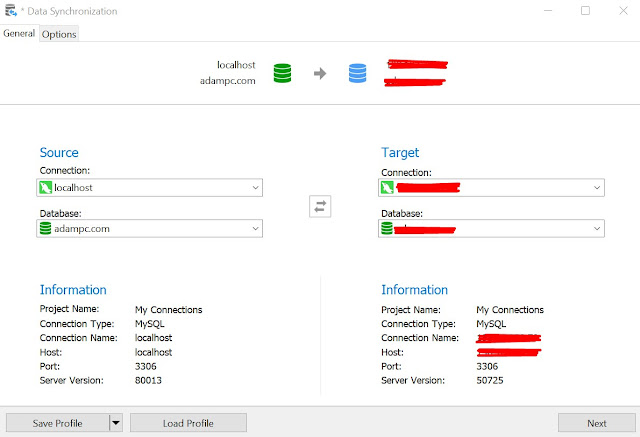
Navicat is a database management tool provided by Premium Soft. I like Navicat so much, it is cool, easy to use and really fast in performance, i mean if i compare with like for example Workbench, it is outperformed it. And Navicat has lot of cool features, one that i really like much is the tool which we can synchronize the database from our local development computer to our server production, when you don't need to manually like for example changing or adding your database structure. There are 2 different synchronizing tools, the one is for synchronizing the structure, second is for synchronizing the data. 1. To synchronize your database, the first thing you need to do is connect both your localhost and your server. 2. Go to Tools menu and select either Data synchronization or Structure synchronization 3. On Source section choose your most updated database, and on target choose the database that you want to update 4. Click next, then compare, wait until it finish the p...

How To HTML Parsing With PHP Xpath Query

Image
I am doing a lot of PHP programming, it is easier than any other language, you don't need any setup to get started with PHP, in Windows there's program called XAMPP, and just about all you need to start a PHP programming. Because the simplicity, I've created many projects using PHP, and it's fun for creating small projects. Enough for the intro, here's some handy tips when you want to do some HTML parsing. 1. To get start, using file_get_contents function to get the HTML content of the page you want to parse, save it in a variable call $contents, whatever you name it. $contents = file_get_contents("https://example.com/the-page"); 2. Declare the DOMDocument class, name the variable $dochtml, again whatever you want. $dochtml = new DOMDocument(); 3. Call the loadHTML, pass the contents from file_get_contents to its parameter. $dochtml->loadHTML($contents); 4. Declare DOMXpath, pass a dom object to it's constructor. $xpath = new DOMX...

MySQL Allow Remote Connection

Image
MySQL is undoubtedly one of the best database server exists, it is widely used by many of companies or even for just personal project around the world, because it is free and yet capable of doing something bigger. For this tutorial we will discuss about how you can allow your MySQL server to be managed by local computer. The reason sometimes, especially for me for doing this approach is, when we want to use an advanced database management tools on our local computer, let's say we have Navicat or Workbench. Without further ado, these are steps how you can do that. My server is Ubuntu and my local computer is Windows, but it think there's no much different. 1. Change bind address on MySQL configuration from localhost to your server IP. Login ssh to your server, and you can use vim for editing "mysqld.cnf" file. sudo vim /etc/mysql/mysql.conf.d/mysqld.cnf # Replace xxx with your IP Address  bind-address        = xxx.xxx.xxx.xxx Restart MySQL. sudo /e...

How To Start Git Web Interface

Image
Git has been a very helpful software development tool, it is so amazing when we are developer given such a free tools that have so much power. But we are not gonna be discussing about git at this moment, this tutorial is a simple and easy steps on how to create a web interface for your git server. We already have a post about how you set up a git server, follow this link for detail How to setup git server . Now login to your server, then init a new git server. git init --bare my-project.git Install ruby on your machine, well if you are using Ubuntu, it is so easy, you can just run this following command and ruby will be installed instantly. sudo apt install ruby Then we just this following command to make our web interface running. sudo git instaweb --httpd=webrick Now you already have a web interface for your git server, it's nothing like Github, but it's still has so many feauture to make our development experiences a bit easier. If you somehow want to stop...

How To Zip And Unzip On Ubuntu Terminal

Image
Well if you are using Desktop, it is easier to do zipping and unzipping an archived files, but if you are doing on server that running Ubuntu, or any other Linux distribution, here's a simple and quick way for you to do basic simple file management on your server. 1. Firstly, you must have an installed zip program ready for your terminal, just type zip to check if it's exists, or you can just run this command, it will check if a zip already on your machine or not, if it is not then it will installing it for you. sudo apt install zip unzip 2. Zip files and folder  on Ubuntu, you can run this commands sudo zip -r your_zip_name.zip directory_of_your_files 3. To unzip a zip file, you can using this commands sudo unzip -d your_zip_name.zip directory_destination That's so easy right, you can do that over and over to make you familiar with those commands, if you somehow forget, you can just bookmark this blog page and comeback whenever you forget.

Can I Delete Package-lock or Yarn-lock File?

Image
The short answer is No, you must not delete the package-lock or yarn-lock file, it is crucial for your project to work and compiled successfully without trouble. Here's the quick explanation, why you should not delete it. Basically when you and some library with node package manager (npm) or yarn, you save it to your "package.json" and when you install your project, the package manager will try to grab some required other library by the library that you use and save it in a lock file when the building process is finished. If you delete the lock file, the package manager you use will try to search it again, searching a newest dependencies that exist, because they can find the lock file. The lock file is basically just a massive dependencies list with the version that was work on last successful compiled. It's still noticeable when your project is not that big, but when you have some bigger project that required a lot of dependencies, it can be really massive m...

How To Start React Using Typescript

Image
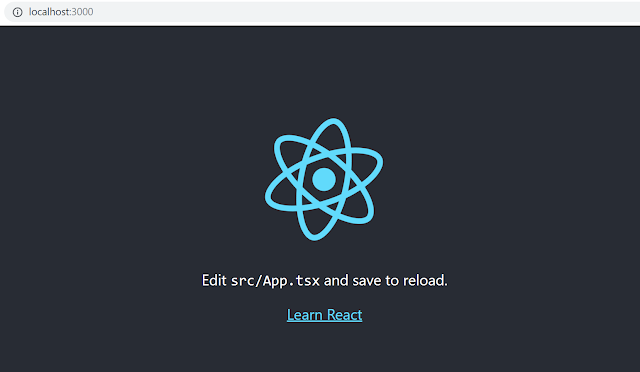
This is how you can start React programming, it is cool framework for build front end web application, and not just for the web, React also can be use as Mobile User interface programming, but we will not cover that in this short tutorial. We are gonna start React programming for web using typescript. Why typescript? it's because typescript supports static type programming, it is recommended to use typed language because your code will be more concise, structured and maintainable, and if you used advanced IDE, you will be given an error event before run time. This is how you can start using React with typescript. 1. Make sure you have Yarn, if you don't, you can download it on this official website:  https://yarnpkg.com/en/docs/install 2. If you are using Windows, you don't need any setup after yarn installation, yarn will do it for your. But, if you using Linux or Mac Os, you should add Yarn global package to your path using this command  export PATH="$PATH:`ya...

Smartphone Frame Free Download - PNG Transparent Format

Image
People often searching for Smartphone or iPhone  frame for many purpose, especially those who want to use it as a frame of their app. There's plenty of that out there, but here's the i give you a free one. And it's transparent, so you just gonna need to create another layer for your app Screenshot on top of this frame. Use your favorite image editor, like Photoshop, etc. But if you don't have one, you can download image manipulating program for free, yes there's such a free kind of program, it's call Gimp, go to this page for more information. Thank you for coming to this blog, i hope you like the image we give to you, don't forget to share this page to other friends, if you want to.

Spring Boot Hello World How To

Image
Spring Boot is framework to make web development in Java much more simpler and easier. With Spring boot developing web application can be faster and without having to do lot of configurations. Many modern Java web application are now using Spring Boot. This post is gonna show you how to create a Hello World in Spring Boot. Just follow the steps bellow. 1. To create a spring boot starter go to https://start.spring.io/ , which you will get the zip version of your project, it will be codes templates. The dependencies we need is only Web, because it's just a simple hello world program, not require database connection or anything. 2. After you got the zip file, extract that file to your project folder, the structure of our hello world project will be like this. 3. Now create new Class for our controller under com.example.demo, we named it WelcomeController.java 4. Run the project. Open the browser and got to http://localhost:8000 Now you can start to build your pro...

Add Android Internet Permission In Manifest

Image
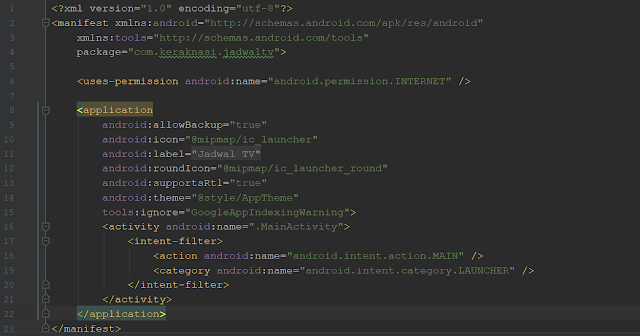
Creating an Android app is easy, and lucky us that Android development has such an incredible Android Studio IDE, it helps us a lot to tell us the error at compile time. But unfortunately, android studio doesn't warn us when we miss something important in manifest file like App permission. We mostly using internet for our app, we get the data from the Rest API, we call the services, which usually a JSON data. And to get your android App working with data on the internet, we must specify one simple line permission in our Manifest file. You can simply add this line of XML code on your manifest. <uses-permission android:name="android.permission.INTERNET" /> Place your code right after the <Manifest> tag. You can look the picture below, it is my Manifest on my android project. Now you can run your project again by clicking the Green triangle button on the top right of Android Studio. Don't forget to inform me if something didn't work well.

How Many Videos Are There On YouTube?

Image
YouTube is video sharing platform that has popularity all around the world, except some few countries that blocked YouTube like China. The content creator on YouTube that made them big are mostly ordinary people who has creativity to create content like Video Blog (Vlog) or Gaming. It so simple you just talk or record the screen of your video game and if you are lucky you can make living with YouTube, many people have been proved it. You can easily make money with money, all you need is quantity even with little quality. It is okay, people like dumb stuff. If you wonder how many videos on YouTube, here's the answer, currently it has over 3 Billion Videos, not including video that has been rejected by YouTube because it's violating the YouTube terms of services. How amazing that number is, it is not surprising, because making video is easy, and with the power of internet uploading it online is not so hard. YouTube is free, and even give they can give you money if you get so...

How To Install Codeigniter 3 Using Composer

Image
Codeigniter 3 Project Structure Codeigniter is PHP framework for creating web application with MVC structure, it is good for creating simple web project, because building using the framework is easy and quick, especially if you are a PHP developer. So here's how you can install Codeigniter with Composer, the PHP package manager we love. So rather than download the zip version end extract it, it get lot more easier using Composer. Here's the command: composer create-project kenjis/codeigniter-composer-installer codeigniter The "codeigniter" you can replace it with your project name, as long as it has no space in it. But we don't recommended using this Codeigniter framework version 3 for building large scale web application, because in the end your code will get clunky and end up being so hard to maintains it. It has no Namespaces, it has no package manager, it has no database migration, it can't integrated with IDE like PHPStorm.

How To Use Sass/SCSS In React

Image
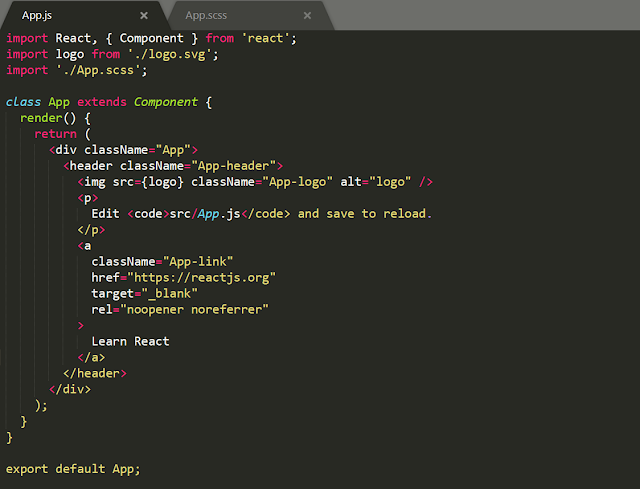
Using React is the new and modern way of building front-end web application, for me basically it is the latest efficient way to build web application, you can be more productive and the codes write would be much much more cool. And you will getting much much more better if you replace a classic CSS file with SCSS, if you don't know what it is, SCSS is super set of CSS, it means that you can write normal CSS within it, with additional for example variable support. Your code will be 100% better. To use React and Scss, you can simply just install the SCSS dependency, and React will handle it in the background, no need any configuration. Just doing these: 1. Add SCSS to your project: npm install node-sass --save 2. Now on your App.js, instead of loading CSS file, you change it to CSS for example: import './App.css' become import './App.scss'; That's it, now you can run your app again by npm start .

Popular posts from this blog

Coding On Your Android Phone Using Termux

How to Install Microsoft Office on Your PC: A Step-by-Step Guide

The Hidden Disk Hogs on Windows Developers Keep Ignoring (And How to Move Them to D:)